Convert PDF footnotes to Markdown
PDF footnotes are not Markdown footnotes here. A sample shows the marker glue to a word, the note text, and the page number this tool drops.
A footnote is just more text in the layer
PDF has no footnote object this converter reads. A raised digit after a sentence and a note at the bottom of the page are ordinary text items with positions and font sizes. Markdown footnote syntax, the kind that starts with a caret and a bracket, is a convention of some Markdown flavors. This tool never emits it. If you need that syntax, you type it after you can see where the note went.
What the tool does do is decide which of those text items are running furniture. A header that repeats, and a line that is only a page number, can disappear. A note that is different on each page should stay. The sample on this page is built so you can see both outcomes from one file.
Steps
- Drop footnotes.pdf on the converter. Leave Detect tables, Strip repeating headers and footers, Rejoin hyphenated line breaks, and Merge broken paragraphs checked, and leave both page boxes empty.
- Read the Markdown. Survey log and the Page lines are gone. Each note sentence is still there as ordinary text, not as a footnote definition.
- Search the output for a caret-bracket marker. This tool does not write Markdown footnote syntax.
- Uncheck Strip repeating headers and footers and convert the same file again if you need the running header and the page labels back.
- If a marker is stuck to the previous word, type a space in the Markdown box. The preview updates as you type.
Worked example
The sample footnotes.pdf has two pages. Both pages draw the same 11 point header, Survey log, and a page label, Page 1 or Page 2. Each page has its own 18 point title, one 12 point sentence with an 8 point digit raised 6 points above the baseline, a second 12 point sentence, a 10 point note, and a separate 10 point line that is only the digit. Options for the first result: Detect tables on, Strip repeating headers and footers on, Rejoin hyphenated line breaks on, Merge broken paragraphs on, From page and to page empty. This is the Markdown:
# Dawn reading

Ice thickness was read at dawn before foot traffic.1

The crew left the gauge in place overnight.

1 Readings exclude the gravel bar, which was bare.

## Afternoon reading

Meltwater pooled where the path dips. 2

The crew left the gauge in place overnight.

2 Tape color is yellow and is not a measurement.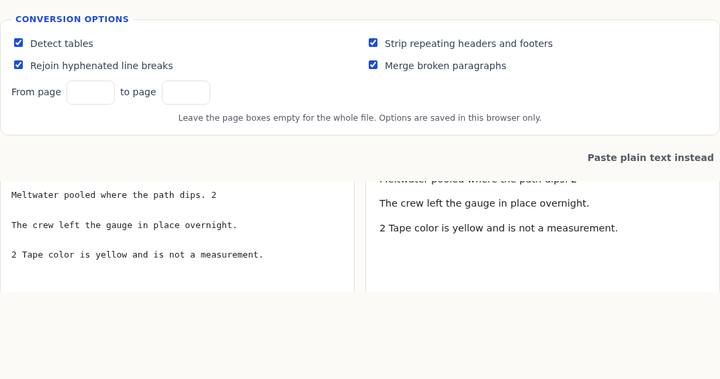
Page 1 writes traffic.1 with no space. PDF.js reports the digit starting half a point after the period, which is too tight for this tool to insert a space. Page 2 writes dips. 2 with a space, because the text layer for that line contains a separate space item between the period and the digit. The converter does not know either digit is a superscript. It keeps the characters it was given.
The note sentences stay because they are not repeated and they are not only a page number. The line that is only 1, and the line Page 1, sit on the bottom edge of the page. A line that is only a page number is removed even on a single occurrence when it is on that edge. The same rule removes Page 2 and the bare 2. Survey log is removed because it is the same edge line on both pages. Dawn reading and Afternoon reading are not repeated, so they stay, and the larger one becomes the first heading.
What changes when strip is off
Uncheck Strip repeating headers and footers and convert footnotes.pdf again. The other three checkboxes stay on, and the page boxes stay empty. The furniture comes back, and the heading levels move:
### Survey log

# Dawn reading

## Ice thickness was read at dawn before foot traffic.1

The crew left the gauge in place overnight.

1 Readings exclude the gravel bar, which was bare.

1

### Page 1

### Survey log

## Afternoon reading

## Meltwater pooled where the path dips. 2

The crew left the gauge in place overnight.

2 Tape color is yellow and is not a measurement.

2

### Page 2
The size histogram explains the promotion. With strip on, the kept sizes are 10 point twice (the two notes), 12 point four times (the sentences), and 18 point twice (the titles). The most common size is 12, so only the 18 point titles are headings. With strip off, 10 point, 11 point, and 12 point each occur four times. A tie goes to the smaller size, so 10 point is treated as the body. Sizes clearly above that are 18, 12, and 11, in that order, which is why Survey log and Page 1 become third-level headings and the 12 point sentences become second-level headings. That is not the tool deciding the sentence is a title. It is the page number and the bare digit staying in the count. Turn strip back on if you want the sentences to stay paragraphs.
The bare digit is its own paragraph in this second result, between the note and the page label. It is not linked to the note. Nothing in the Markdown points from traffic.1 to the line that says the gravel bar was bare. You can add that link yourself if the editor you paste into understands footnote syntax. This page will not invent the link.
Common mistakes
Expecting a caret-bracket footnote. The output will not contain one. Searching for it and finding nothing means the tool worked as designed, not that the note was deleted. Look for the note sentence instead.
Leaving a bare digit on the bottom edge and then wondering where the marker went. In the default result the line whose entire text is 1 is gone, because it matches a page number and it is one of the two lowest lines. The note that begins with 1 followed by words is kept. If your real footnote marker is a line by itself under the note, check the edge of the page before you blame the note.
Turning strip off to “keep the footnotes” when the notes were never the thing being removed. On this sample, strip off also promotes the body sentences to headings. If you only wanted the note text, the default result already has it. Use the Markdown box to separate traffic.1 into a word and a marker rather than turning the header strip off.
A scanned footnote is still a picture. If you cannot select the note in a normal PDF viewer, this tool has no characters to keep. That limit is the same one described in the guide for a page with no text layer, and no checkbox on the converter adds recognition.
Questions
Will the note move to the end of the Markdown file?
No. It stays in reading order where the text layer put it, which on this sample is after the body sentences of the same page and before the next page’s title. There is no collected notes section.
Why did the digit stick to the period?
On page 1 the digit starts about half a point after the period. A gap that small is not treated as a word space. Page 2 has a real space item in the text layer, so the space survives. The tool does not raise or lower the digit.
Does Detect tables affect footnotes?
Not on this file. The notes are single lines, not aligned columns. Leaving Detect tables on or off does not turn the note into a table and does not create footnote syntax.