Remove headers and footers from PDF text
Drop repeating running titles and page numbers while converting a PDF to text or Markdown, without deleting the body sentence that happens to repeat.
Removal is not the same as editing the PDF
Search results for removing headers and footers often show how to white out or delete furniture inside Acrobat so the printed page changes. That is a different job. This page is about the text you get while converting. The PDF file is left untouched. Only the Markdown omits lines that behave like a running header, a running footer, or a page number.
The strip option is on by default. It is saved with the other toggles in this browser. The PDF bytes are not saved. Changing the toggle reruns the file that is already in memory.
Steps
- Open the converter and leave Strip repeating headers and footers checked. Leave both page boxes empty so every page is included.
- Drop the PDF. This page uses the four-page field notes sample.
- Search the Markdown for the running title and for a line that is only a page number.
- If a real sentence vanished, it was repeated on the top or bottom of at least half the pages. Uncheck the strip option and the file converts again from memory.
- To keep one page, type that page number in both boxes, then leave the field so the range is applied.
Worked example
The sample headers.pdf has four letter-size pages. Every page paints “Field Notes Internal” at the top and “Page 1” through “Page 4” at the bottom. The same crew sentence appears on every page, but it sits in the body, not in the top or bottom two lines. Each page also has its own Alpha, Beta, Gamma, or Delta sentence and two unique closing lines. This is the full Markdown from a conversion with the strip option left on:
Alpha body sentence about gauges placed along the bank.

The crew recorded water level, air temperature, and cloud cover.

A second line keeps the page from being only a header and a footer.

A third line gives the edge detector real body text to leave alone.

Unique tail 1 stays because this sentence is not repeated.

Closing observation 1 belongs only on this page.

Beta body sentence about thaw arriving earlier than the logbook expected.

The crew recorded water level, air temperature, and cloud cover.

A second line keeps the page from being only a header and a footer.

A third line gives the edge detector real body text to leave alone.

Unique tail 2 stays because this sentence is not repeated.

Closing observation 2 belongs only on this page.

Gamma body sentence about silt settling in the still water.

The crew recorded water level, air temperature, and cloud cover.

A second line keeps the page from being only a header and a footer.

A third line gives the edge detector real body text to leave alone.

Unique tail 3 stays because this sentence is not repeated.

Closing observation 3 belongs only on this page.

Delta body sentence about dusk closing the survey.

The crew recorded water level, air temperature, and cloud cover.

A second line keeps the page from being only a header and a footer.

A third line gives the edge detector real body text to leave alone.

Unique tail 4 stays because this sentence is not repeated.

Closing observation 4 belongs only on this page.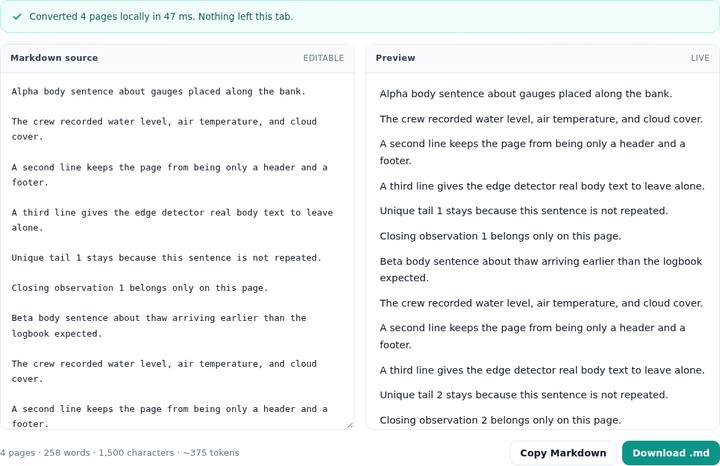
“Field Notes Internal” is absent. So is every “Page N” line. Alpha, Beta, Gamma, and Delta are all present, in that order. The crew sentence is present four times. That repetition is the point of the sample: a sentence that repeats in the body is not furniture, and the converter must not delete it just because the wording matches.
Which lines are eligible
On each page the text lines are ordered by vertical position. The top two and the bottom two are marked as edges. Only edge lines can be removed. A line in the middle of the page is never a header, even if the same words appear on every page. That is why the crew sentence survived.
Among edge lines, the text is normalized: case folded, extra spaces collapsed, and trimmed. If that key shows up on at least two pages and on at least half of the pages you converted, rounded up, it is a running head or foot and it is dropped. Four pages need the line on two or more pages, and half of four is two, so the title on all four pages qualifies. A title that appears on only one page of a long report does not.
Page numbers are a separate rule. An edge line that is only a page number is removed even when the digits change, so “Page 1” and “Page 2” do not have to match each other. The pattern accepts a bare integer, an optional “page” prefix, and an optional “of N” or “/ N” suffix. “See page 2 for the map” is not that pattern, and it is not removed by this rule.
A very short page is a real limit. If a page has only three text lines, the top two and the bottom two overlap, so almost every line is an edge. A repeated body line can then disappear. The sample gives each page a header, six body lines, and a page number so the middle four stay ineligible. If your export looks too short, uncheck the option once and see which lines come back.
Page range changes the evidence
The from and to boxes limit which pages are read before the repeat check runs. Empty boxes mean the whole file. A range of 2 to 2 on this sample keeps the Beta sentence and drops Alpha, Gamma, and Delta, because those pages are not read. With only one page in the range, the running title is no longer “repeated”, so it can remain, while an edge “Page 2” can still drop. Use the full range when the goal is furniture removal. Use a tight range when you only want one section and you are willing to delete a leftover title by hand.
Nothing here paints white boxes onto the PDF, and nothing promises to catch a header that is a logo with no text layer. A scanned running title has no words to delete. That case is covered in the guide on pages with no text layer.
Questions
How does PDFtoMD decide a line is a header?
A line is eligible only when it sits in the top two or bottom two text lines on its page. The same normalized text must appear on at least two pages and on at least half of the pages in the range you converted.
Are page numbers removed even when the number changes?
Yes. An edge line that looks like a page number is dropped even when the digits differ. Examples are 3, Page 3, and Page 3 of 12. A number in the middle of a sentence is kept.
Will a one-page range still drop the running title?
No. A one-page range can drop an edge line that looks like a page number, but a repeated title needs at least two pages. Convert the whole file if you want that title removed.