Keep headings when converting a PDF to Markdown
See how font size becomes Markdown heading levels, and when a short line becomes a heading even at body size.
A PDF has sizes, not heading tags
Markdown wants #, ##, and ###. A PDF does not store those tags. It stores a font size, sometimes a bold face, and a position. Keeping headings when you convert means ranking those sizes and refusing a few shapes that are obviously sentences. Guessing from a table of contents, or from a numbering scheme like “1.2.3”, is not what this converter does. If the PDF never changed font size, the outline will be weaker, and this page says so instead of pretending every outline survives.
Steps
- Open the converter and drop a PDF whose title is visibly larger than the body text.
- Compare the Markdown # lines with the PDF. Bigger type should be a higher heading, and the body sentences should not start with #.
- If a short label at the same size as the body became a heading, that is the short-line rule, not the size rule. Edit the # off if it is wrong.
- Remember that the document gets only one level-one heading. A later line of the same largest size becomes level two.
- Download or copy after the outline matches the PDF. Changing the other toggles does not turn font sizes off.
Worked example
The sample headings.pdf uses three sizes on purpose. “Kitchen Inventory” is 22 point. “Dry goods” and “Tools” are 16 point. The two sentences are 11 point. All of the labels are bold, and the sentences are not. This is the Markdown:
# Kitchen Inventory

## Dry goods

Oats, rice, and lentils are stored in metal tins on the low shelf.

## Tools

The small scale sits beside the kettle and is checked each Monday.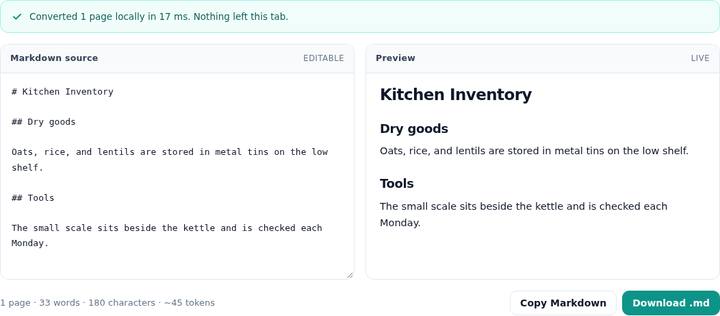
The 11 point lines are the most common size, so they are the body. 22 point and 16 point are both well above an 8 percent increase, so both rank. The larger rank is written with one #. The next rank is written with two. The sentences are longer and end with a period, so they would not qualify as headings even if a size rank had been close.
The size rank
Sizes are bucketed to the half point. The bucket that occurs most often, preferring the smaller size on a tie, is the body. If the biggest size in the document is not at least about 12 percent above that body, there is no size profile at all. The converter does not invent heading levels from noise in the font metrics. When a profile exists, at most three sizes that clear about 8 percent above the body are kept, sorted from largest to smallest. A line whose size matches a rank becomes a heading at that depth, unless the line is longer than 120 characters or ends with sentence punctuation. Those are treated as body text even when the type is large, because a pull quote is not a title.
Only one level-one heading is emitted for the whole conversion, including across pages and across a table that splits the text. A second line that would have been level one is written as level two. On a paper, that is why a later “References” in a smaller-but-still-large size stays under the title instead of starting a second top heading. The references sample is in the research-paper guide.
When every line is the same size
If the profile is missing, a short-line rule fills in. A line of at most 58 characters, with at most nine words, and with no period, question mark, comma, or similar ending, can be a heading when it is the first line, when a vertical gap precedes it, or when the next line is long. Three or more such short lines in a row, with no gap, become a bullet list instead of a stack of headings. That is how a same-size title above the field-kit table became a single # in the tables guide: it was short, it was first, and the table was split out of the paragraph, so the title stood alone. It was not a larger font. If that # is wrong for your file, delete the marks in the source box. There is no separate “heading strength” slider.
Bold does not create a level. A bold body line of reasonable length is wrapped as **text**. A heading that is also bold is not double-wrapped. The kitchen sample’s headings are bold in the PDF and come out as plain # lines, which is what you want in Markdown.
What still needs a human
A running header in a large font can look like a second title on every page until the header strip removes it. A caption in a slightly larger size can steal a rank. Numbered section titles survive as headings only when their size or their short shape qualifies. The number stays in the heading text. “1. Introduction” as a normal ordered-list line is a list item instead, because lines that match a number-plus-separator pattern are lists. If your outline depends on that distinction, check the first page before you convert a hundred files in the batch list.
Questions
How are heading levels chosen?
The most common font size on the converted pages is treated as body text. Up to three sizes that are clearly larger, biggest first, become level one, two, and three. A later level-one heading is written as level two so the note has a single top heading.
Why did a same-size line become a heading?
When no size is clearly larger than the body, a short line can still become a heading. It must be at most 58 characters, not end with punctuation, and contain at most nine words, and it must be the first line, follow a gap, or sit before a long line.
Does bold text become a heading?
Not by itself. A bold line at body size is wrapped in double asterisks. It becomes a heading only if its size ranks above the body or the short-line rule applies.