Convert a research paper PDF to Markdown
Read a two-column paper left column then right, keep a spanning title, and know which academic layout this tool will not invent.
Two columns are a reading-order problem
A journal PDF often sets the title across the page and the body in two columns. Select-all in a viewer frequently alternates: a left line, a right line, a left line. The sentences become nonsense. Converting a research paper to Markdown is mostly about reading each column through before starting the other, and about not promoting the references line into a second title of the whole document.
This converter is a coordinate heuristic, not a layout model trained on papers. It will not recover a figure, a floated table that spans both columns with wrapped cells, or a formula drawn as paths. The sample below is a controlled two-column page so you can see the order when the heuristic matches the page. If your paper is denser, use the sample as a checklist, not as a promise that every journal style will match.
Steps
- Open the converter and drop the paper. Leave Merge broken paragraphs on so wrapped lines inside a column become sentences.
- Check the title. A line with no text beside it should come out once, above both columns, not repeated inside a column.
- Read the body. The left column should finish before the right column starts, rather than alternating line by line.
- Check the references or any other full-width line. It should sit after the columns it separates, not inside one of them.
- Do not expect equations, figures, or footnotes to be reconstructed. Fix those in the Markdown box or leave them out.
Worked example
The sample paper.pdf is one letter-size page. The title “Field notes on river ice thickness” is 18 point and has empty space beside it. Four 11 point sentences start at x 54. Four more start at x 340, on the same baselines, 16 points apart. Below both columns, “References consulted after the river survey” is 14 point, and a closing 11 point line spans under the columns. This is the Markdown:
# Field notes on river ice thickness

Left column begins with gauges set in the shade. Ice thickness was read at dawn before foot traffic. The left bank stayed thicker than the channel. Notes stayed in one column until the gutter.

Right column begins with thaw along the gravel. Meltwater pooled where the path dips. The crew marked soft spots with tape. Right side text must follow the left side.

## References consulted after the river survey

A closing line under both columns records that the logbook stayed on paper.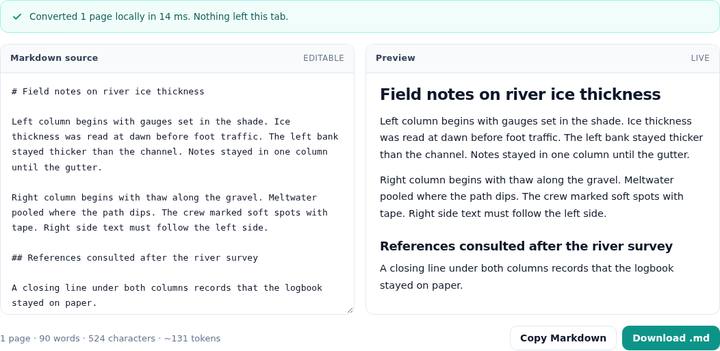
The four left sentences are one paragraph, then the four right sentences are the next paragraph. They were not interleaved. The references line is a level-two heading, not a second level-one heading, because the title already took the single top slot and 14 point still ranks above the 11 point body. The closing line follows the references line. It was not absorbed into the right column.
What counts as a gutter
Items are grouped by where they start horizontally. One empty band between a left cluster and a right cluster, inset from the edges of the text, can be a gutter. At least three text items on each side must be long, about 90 points or more, so a row of short table cells is not mistaken for an article. The field-kit price table fails that test and stays a table. This paper passes it: the sentences are long and there is a single band between the two start positions.
A line is full width when it actually crosses the band, or when nothing on the other side shares its baseline. The title, the references line, and the closing line have no partner at their height, so they stay full width. Between those separators the converter emits the left lines and then the right lines. The first line of each stretch is a forced paragraph break, which is why the right column does not continue the left column’s sentence.
Inside a column, lines 16 points apart at 11 point type are closer than the paragraph threshold of about 1.7 times the font size, so they merge into one paragraph. A larger gap inside a column would stay a new paragraph. Hyphen repair still applies inside that merge.
Layouts that stay broken
Three columns do not match the “exactly one gap” test, so the page falls back to top-to-bottom order and the columns can interleave. A short references label that happens to share a baseline with a column line can be pulled into that column. Footnotes at the bottom of a column are just more text in that column, or they look like footers if they repeat. A header that repeats on later pages can be stripped when you convert more than one page. This sample is a single page, so there is no repeated header to remove.
Merged table cells, equations, and figures are out of scope. A results table with aligned short cells may become a pipe table, which you should check digit by digit. A table whose cells wrap will usually come out as lines. Superscript citation numbers survive only as the characters in the text layer, often on the baseline. There is no bibliography parser and no DOI lookup. If the page is a scan, you get a warning and no words. The tool does not add a text layer.
Questions
How is a two-column page read?
The converter looks for one open band between left-starting text and right-starting text, with several long lines on each side. It then reads the left side from top to bottom, then the right side. A line with no neighbor at the same height stays full width and separates those stretches.
Why did the columns turn into a table?
Short aligned cells look like a table, not like article columns. Column mode requires long lines on both sides of a single gap. A real results table should become a pipe table instead, which is a different guide.
Are equations converted to LaTeX?
No. Whatever characters are in the text layer are copied as text. A glyph that is not in the text layer is omitted. This tool does not redraw formulas.