Password-protected PDF to Markdown
A password-protected PDF is refused in the browser. See the exact status line, the public locked sample, and why this tool never asks for the password.
The converter does not collect a password
Opening a PDF here calls the bundled PDF.js reader with the file bytes, a same-origin worker, and isEvalSupported: false. The call does not include a password. There is no password box on the page, and the paste panel is for document text, not for a secret. If you type a password into the paste panel, the converter treats those characters as text to turn into Markdown. It does not apply them to the PDF.
When the reader throws, the page looks at the error message. If that message contains the word password in any letter case, the status line under the drop zone is exactly: This PDF is password protected. Remove the password and try again. The Markdown pane stays hidden. Nothing is copied to the clipboard for you. If the message does not contain that word, the status line is: Could not read this PDF. It may be encrypted or damaged.
The sample that produces the first line is locked.pdf. It is a one-page public file. Its user password is field-notes. The only sentence in the text layer, once a reader is allowed to open it, is “The locked note says the gauge stayed covered.” This site will not ask you for field-notes and will not type it in for you. The password is printed here because the file is a sample we published, not because the converter accepts it.
Steps
- Drop the PDF on the converter. This page uses the locked sample, which cannot be opened until a password is supplied to a reader.
- Read the line under the drop zone. When the reader’s error text contains the word password, that line is: This PDF is password protected. Remove the password and try again.
- Unlock a copy in a PDF tool you already trust, using a password you are allowed to use. This site has no password field and does not send the file anywhere.
- Drop the unlocked copy. The usual toggles apply: tables, repeating headers, hyphen repair, and paragraph merging.
- If the line instead says the file may be encrypted or damaged, the reader failed for a reason other than that password wording. Check that the download is a complete PDF.
Worked example
Drop locked.pdf on the converter with the network connected or not. After PDF.js loads from this origin, the status line changes and the output pane does not open. There is no table, no heading, and no copy of the gauge sentence. The bytes were read with the File API inside the tab so the reader could try to open them. They are not placed in a request body. Closing the tab drops that copy from the page’s memory.
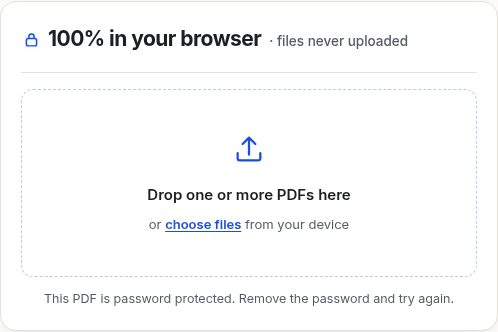
The reader error behind that sentence, for this sample, is a password exception whose message is “No password given”. The page does not show the exception name. It only checks the message text, then replaces it with the fixed sentence above. A different PDF.js build could phrase the exception differently. The check is the substring password, not a list of product names.
An unlocked copy of the same page converts as ordinary text. With the default toggles, the single sentence is the Markdown. It is short, it has no larger heading font, and it ends with a period, so it stays a paragraph rather than a heading. You can compare that shape with the headings guide if a title you expected did not become a # line.
Why there is no password box
A password field would ask you to type a secret into a page that is only supposed to handle files locally. This preview does not want that secret, does not store one, and does not offer an account where one could live. Unlocking is a separate job, done in a program you already use for PDFs you are allowed to open. After you have a copy with no user password, bring that copy back. The converter then behaves like any other text PDF.
This page will not walk through password recovery, guessing, or removal of a password you do not know. If you cannot open the file, the converter cannot either. Emailing the locked PDF and the password to hello@pdftomd-qgu.pages.dev would send both to a mailbox, which is the opposite of the local design. For a confidential file, describe the status line instead. The public sample is the one file that is safe to name.
Honest limits
Some PDFs carry an owner password that restricts printing or copying, while the reader can still open the text without a user password. If PDF.js opens the file, conversion runs. This page does not inspect permission flags on its own. A file that opens is a file the reader could read. A file that throws a password error is refused, even if you know the password and would be happy to type it.
A damaged download can hit the other sentence, “Could not read this PDF. It may be encrypted or damaged.” So can an encryption method the reader does not implement, when the error text happens not to include the word password. The status line is not a forensic report. It is two sentences. Retry the file from the original source before you assume the converter is broken. A zero-byte file and a half-saved download are damaged files, not password files.
A scan that is also locked fails before any text-layer check. You will see the password line, or the damaged line, not the “No text layer” banner. That banner is only for a file the reader could open. The no-text-layer guide applies after the file opens. Page boxes do not matter until the file opens either. A locked file is not clipped to a range, because no pages are read.
The page-range boxes and the four toggles may still be saved in localStorage under pdftomd.options.v1 if you changed them earlier. That record does not gain a password field when this error happens. The privacy page lists the stored keys. None of them is the PDF and none of them is a password.
Questions
Can I paste the password into the page?
You can paste it into the text panel, and the panel will try to convert those characters as a document. It will not unlock the PDF. There is no other field that accepts a password.
Does the error mean the file was uploaded?
No. The file is read in the tab. PDF.js is loaded from this site the first time you convert. The request is for that script, not for your PDF. A failed open still does not post the bytes.
What should the Markdown look like after I unlock the sample?
The text layer is one sentence: The locked note says the gauge stayed covered. With the default toggles it comes back as a paragraph. The sample has no table, no running header, and no second page.