Convert one PDF page range to Markdown
The From and to boxes choose which PDF pages are read. See how blank, reversed, and out-of-range numbers are clamped, using the four-page field notes sample.
The boxes are page numbers, saved as text
Under the conversion toggles, two boxes are labeled From page and to page. They are read when a PDF is opened. Each file in a batch uses the same box text, then the numbers are clamped to that file’s own page count. A four-page handout and a twenty-page report do not share a clamped result if you typed a number that only the longer file contains. The stored value is the text you typed, not the clamped number from the previous file.
The value is saved in this browser under the key pdftomd.options.v1, in the from and to fields, along with the four toggles. The PDF is not in that record. Clearing site data for this origin clears the boxes. If storage is blocked, the boxes still work until you leave the tab.
The boxes update the conversion on the change event, which is when you leave the field or commit the value. Typing alone does not rerun the file on every keystroke. If no PDF is loaded yet, leaving the field only stores the text. The next drop uses it.
Steps
- Open the converter. The page boxes apply to a PDF only. Pasted text ignores them.
- Type the first page in From page and the last page in to page. For a single page, type that number in both boxes.
- Leave the field so the change is saved. If a PDF is already in the tab, that file is converted again on the new range.
- Read the Markdown. Pages outside the range are not extracted, so their sentences are absent.
- Clear both boxes and leave the field to read the whole file again. An empty box means the start of the file or the end of the file.
How a number is clamped
The parser is the browser’s base-10 integer parse. A box that is empty, or that does not start with a digit, is missing. A missing From page becomes page 1. A missing to page becomes the last page. A value that starts with digits uses those digits, so 2abc is read as 2. After that, numbers below 1 are raised to 1, and numbers past the last page are lowered to the last page. If From is then greater than to, the two numbers swap. The range is inclusive: page 2 through page 2 is one page, and page 2 through page 4 is three pages.
On a file with 4 pages, the boxes resolve like this:
| From page | to page | Pages read |
|---|---|---|
| 2 | 2 | 2 |
| empty | empty | 1 through 4 |
| 2 | empty | 2 through 4 |
| empty | 2 | 1 through 2 |
| 3 | 1 | 1 through 3, after the swap |
| 9 | 9 | 4, because both ends clamp to the last page |
| 0 | 2 | 1 through 2, because 0 is raised to 1 |
The summary line counts the pages that were read, not the page numbers printed inside the PDF. A range of 2 to 2 reports one page. That count can disagree with a footer that says “Page 2 of 4”. The footer is text. The summary is how many pages the loop opened.
Worked example
The sample headers.pdf has four pages. Each page has the running title “Field Notes Internal”, one Alpha, Beta, Gamma, or Delta sentence, the same crew sentence, two unique closing lines, and a “Page N” line. Set both boxes to 2, leave the field, and drop the file with Strip repeating headers and footers left on. Alpha, Gamma, and Delta are absent because those pages are never read. This is the Markdown:
# Field Notes Internal

Beta body sentence about thaw arriving earlier than the logbook expected.

The crew recorded water level, air temperature, and cloud cover.

A second line keeps the page from being only a header and a footer.

A third line gives the edge detector real body text to leave alone.

Unique tail 2 stays because this sentence is not repeated.

Closing observation 2 belongs only on this page.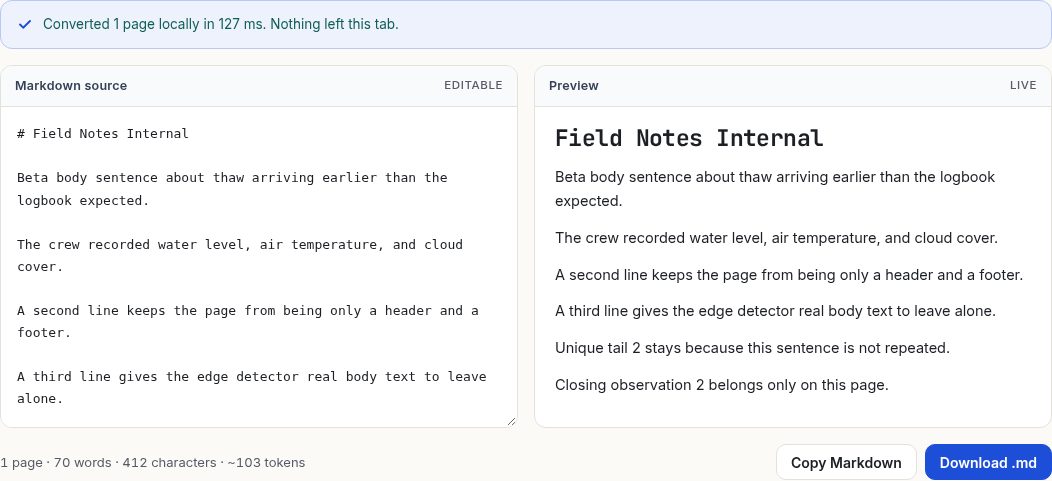
“Page 2” is gone. An edge line that is only a page number is dropped even when the range contains a single page. “Field Notes Internal” stays. The rule that deletes a repeated running title needs at least two pages in the range, and this range has one. The same title is removed when you convert all four pages, which is the case the headers and footers guide shows. Use the full file when the goal is to drop a running title. Use a one-page range when you want one section and you are willing to delete a leftover title by hand.
The leftover title is also a heading here, written as # Field Notes Internal. Every text line on the page is 11 or 12 point, so there is no larger font to rank as a heading. The first short line that is not a sentence then becomes the level-one heading. “Field Notes Internal” is that line. It is not a heading in the full four-page conversion, because there the line is removed before headings are chosen. A one-page range can therefore both keep furniture and promote it. That is a limit of the heuristic, not a description of the PDF’s outline.
Honest limits
Pasted text does not use the boxes. The paste path runs the same paragraph and list rules and ignores page numbers, because a paste has no pages. If you need a slice of pasted text, delete the lines in the Markdown box.
A batch applies one pair of boxes to every file. Two PDFs dropped together with From set to 2 will each start at their own page 2, or at their last page if a file has only one page. The zip is still pdftomd-batch.zip, built in the tab, with one Markdown file per PDF that produced text. A file that is empty inside the range is listed as having no text layer for those pages. It does not borrow text from pages you excluded.
The range cannot see a logical section that is not a page boundary. “Chapter 3” is not a box. If chapter 3 starts halfway down page 14 and ends halfway down page 18, the closest range is pages 14 through 18, and you delete the leftover paragraphs. The tool does not read bookmarks. A password-protected file fails before the range is applied. That case has its own guide.
Header removal, hyphen repair, and table detection run only on the pages that were read. A table split across a page you excluded will look unfinished. A hyphen at the bottom of the last included page has nothing to join if the next syllable is on the next page. Widen the range by one page when a word or a row looks cut off, then delete the extra paragraph.
Questions
What if From is greater than to?
After each end is clamped to the file, the two numbers swap. From 3 and to 1 on a four-page file reads pages 1 through 3. The boxes on screen still show what you typed until you edit them. The swap is in the read, not a rewrite of the fields.
What does a blank box mean?
A blank From page means page 1. A blank to page means the last page. Both blank means the whole file. A box of spaces is blank. A box with no leading digit is treated as blank.
Does the range change a file that is already open?
Yes, when you leave the field. The bytes already in the tab are read again for the new range. You do not have to drop the PDF a second time. You do have to leave the field. Typing the number without leaving the box does not rerun the conversion.