PDF bullet points to a Markdown list
See which PDF bullet glyphs become a Markdown list, which characters stay plain text, and what a wrapped item turns into.
The glyph has to be one of a fixed set
A PDF bullet is a character drawn at the start of a line. It is not a list structure. This converter turns a line into a Markdown item only when the first character is in a fixed set and the next character is whitespace. The set is the round bullet, the white bullet, the small black square, the small white square, the middle dot, the hyphen bullet, the bullet operator, the en dash, the em dash, the black circle, the white circle, and the ordinary hyphen-minus. The line is then written as a dash, a space, and the rest of the text. The original glyph is not kept.
An asterisk is not in that set. A plus sign is not in that set. A line that starts with either one stays a paragraph, asterisk or plus included. A numbered line such as 1. followed by a space is a separate test and becomes an ordered item. The digit you typed is not copied: a counter starts at 1 after any line that was not itself a list item. In the sample below the PDF already said 1 and 2, so the numbers look preserved. The lettered-list guide is the file where the original marker and the output number differ.
Steps
- Drop bullets.pdf on the converter with Detect tables, Strip repeating headers and footers, Rejoin hyphenated line breaks, and Merge broken paragraphs left on, and with the page boxes empty.
- Compare the Markdown with the glyphs in the PDF. A bullet, a hyphen, a middle dot, and an en dash become dash items. An asterisk and a plus sign do not.
- Find the wrapped bullet. The second visual line is the next paragraph, not the tail of the list item.
- If a glyph you needed stayed as plain text, retype that line in the Markdown box with a dash and a space.
Worked example
The sample bullets.pdf is one page. The title is 18 point. Every other line is 12 point, and every marker is followed by a space in the text layer. Options used: Detect tables on, Strip repeating headers and footers on, Rejoin hyphenated line breaks on, Merge broken paragraphs on, From page and to page empty. This is the Markdown:
# Field kit checks

- Gauge covers are latched
- Spare batteries sit in the tin
- Middle dot items count as bullets
- En dash items count as bullets

* Asterisk lines are not bullets

+ Plus lines are not bullets either

1. Read the north gauge
2. Read the south gauge
- The surveyor checked every gauge

before writing the total in the log.

A closing sentence sits well below the list.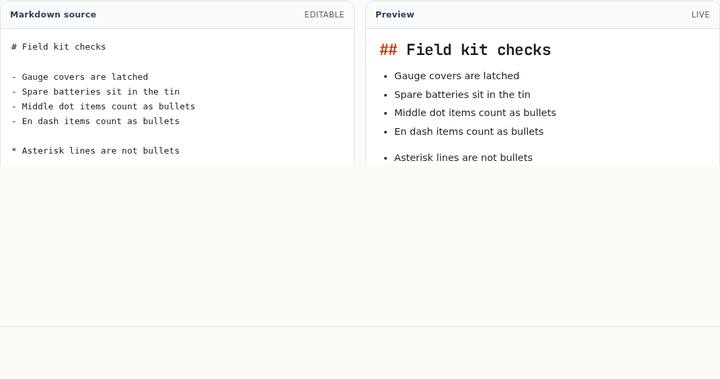
The four matching glyphs become one tight list: a single newline between items, no blank line. The asterisk line is not a list item, so it is set off with blank lines, and the plus line is set off the same way. The numbered lines start a new run. The bullet that follows them is also a list line, so it sits on the next line with no blank line between 2. Read the south gauge and - The surveyor checked every gauge.
Why the wrapped line fell out of the item
The PDF draws • The surveyor checked every gauge at y 514 and before writing the total in the log. at y 500. The gap is 14 points. At 12 point type the paragraph threshold is about 1.7 times the font size, roughly 20 points, so those two lines are close enough to be one paragraph. They still do not become one list item. The bullet line is closed as soon as it matches, and the following line starts a new paragraph. Merge broken paragraphs joins body lines to each other. It does not append a body line to a list item that has already been emitted. That is why the Markdown has a blank line and then before writing the total in the log. as its own paragraph.
The closing sentence sits at y 460, 40 points below the wrap. That gap is outside the threshold, so it would have been its own paragraph even if the wrap had joined. The distance is not what split the bullet. The list rule is.
There is no checkbox that says “keep wrapped bullets together.” If the second line belongs in the item, edit the Markdown box and delete the break. The preview is the list you will copy.
Common mistakes
Treating an asterisk as a bullet. In Markdown an asterisk often starts a list, so it is reasonable to expect the same here. This converter does not. The sample line * Asterisk lines are not bullets is still in the output, asterisk included, with blank lines around it. A plus sign is the same kind of miss. Retype those two lines if you want them in the list.
A glyph with no space after it. The matcher requires whitespace between the marker and the words. Every line in bullets.pdf has that space. A line whose text layer is the hyphen glued to the word, with no space, does not match and stays plain text. Zoom in on the PDF if a line you expected to be a list survived unchanged. The character you see and the character in the text layer are not always the same width apart.
Expecting the wrapped tail to stay indented under the bullet. It will not. Pull it up into the item by hand, or leave it if it really was the next sentence. The closing sentence in this file is a real next paragraph, which is why the wide gap was left as a blank line.
A row of short lines with no glyph at all can also become a list, but only when the page has no larger heading size. That is a different rule, with its own sample. Do not “fix” it by hunting for a bullet character that was never drawn.
Questions
Which glyphs in the sample became dashes?
The round bullet, the hyphen-minus, the middle dot, and the en dash. Each was followed by a space. The output uses a hyphen-minus for all four. The original glyph is discarded.
Why is there no blank line between the numbered lines and the next bullet?
Both lines are list lines, so the converter separates them with one newline. A blank line is used when the next line is not a list line, which is what happens around the asterisk and the plus sign.
Do the checkboxes change which glyphs match?
No. Detect tables refuses to treat a bullet line as a table row, which keeps a list from becoming a one-column table, but the glyph test itself does not depend on the four checkboxes. Turning merge off still leaves the wrapped tail as its own paragraph, because the bullet line was already closed.